



Yes, once logged into SPS, Certifying Officers (CO’s), Data Entry Operators (DEO’s), and Trusted Enrollment Agents (TEA’s) can click on the icon showing a blue circle with a white question mark found on the home page and other screens .
An FPA ID is the Federal Program Agency ID.
Active SPS users can find it on the top left of the SPS home page below their name.
DEO’s are enrolled under an FPA ID only. CO’s are enrolled under both an FPA ID and one or more Agency Location Codes (ALC’s).
Certifying Officers, Data Entry Operators, Designated Agents, and Trusted Enrollment Agents are valid for one year from the designation date, and are renewed annually.
Designating Officials and Head of Agency designations are valid for two years from the designation date and are renewed every two years.
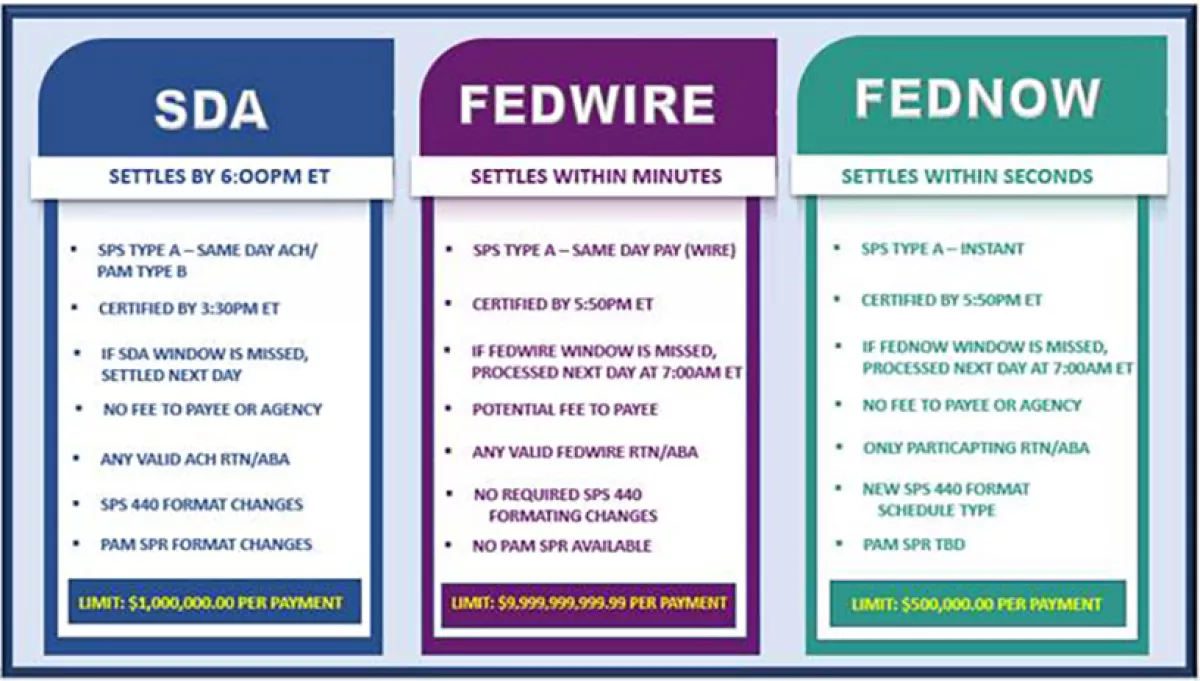
See the Treasury Financial Manual https://tfx.treasury.gov/tfm/volume1/part4a/chapter-3000-requirements-scheduling-payments-disbursed-bureau-fiscal-service
From the SPS main screen, View System Information by selecting this icon:

Select "Save Current Configuration" and "Save"
The file will be saved in your C:\\SPS-SC\\logs folder under the name "SYSTEM_CONFIG_..."
Open the text (.txt) file and look for "SPS Installed Version: XX"