



To better protect your agency's financial transactions, ASAP.gov updated its minimum computer and internet browser requirements.
ASAP.gov no longer supports Transport Layer Security (TLS) 1.0 and 1.1. As a result, your computers need to use an operating system and internet browser that supports TLS 1.2.
| Software | Supported | Unsupported (not able to use ASAP.gov) |
|---|---|---|
| Operating System | Windows 7 and above | Windows XP or Vista, Macintosh, or Linux systems |
| Internet Browser | Browsers that support TLS 1.2 | Internet Explorer (all versions) |
Security Setting
Required: Transport Layer Security (TLS) 1.2
To better protect your financial transactions, ASAP no longer supports TLS 1.0 or 1.1.
Both federal agencies and recipient organizations must make sure that their internet browsers support and are set for TLS 1.2.
The instructions below show you (or your IT staff) how to select TLS 1.2 in each browser.
(Agencies: Help your recipient organizations adjust their browser settings with these instructions.)
- Type internet options in the Windows search menu.
- Click Internet Options.
- Select the Advanced tab.
Scroll to the Security section, then check Use TLS 1.2.
Image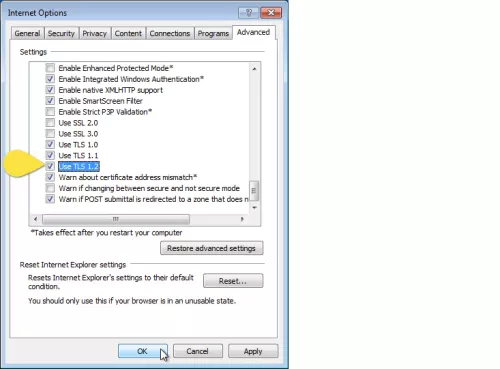
- Click Apply and then OK, then close Edge. TLS v1.2 will be enabled the next time you select Edge.
- test
- Type "about:config" into the address bar
- Search for "security.tls.version.min"
- Double-Click on security.tls.version.min
- Enter the number one in the Enter Integer Value box
- Click OK
- Search for "security.tls.version.max"
- Double Click on security.tls.version.max
- Enter the number 3 in the Enter integer value box
- Click OK
When finished, confirm your setting are similar to the following graphic. This ensures your browser is able to use the most secure connection for ASAP.gov
Image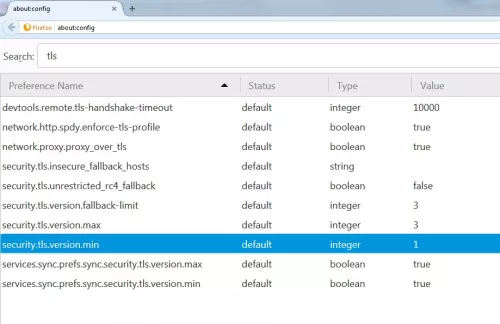
- Click the Menu button
- Click Settings
- Click Show advanced stings
- Click Change proxy settings
- Click on Advanced
- Ensure that the boxes for security.tls.version.min “Use TLS 1.0”, “Use TLS 1.1”, “Use TLS 1.2” are checked. If they are not selected, select them. This ensures your browser is able to use the most secure connection for ASAP.gov.
- Click Apply
If you are unable to modify these settings so they match the graphic below, please contact your IT Support for assistance
Image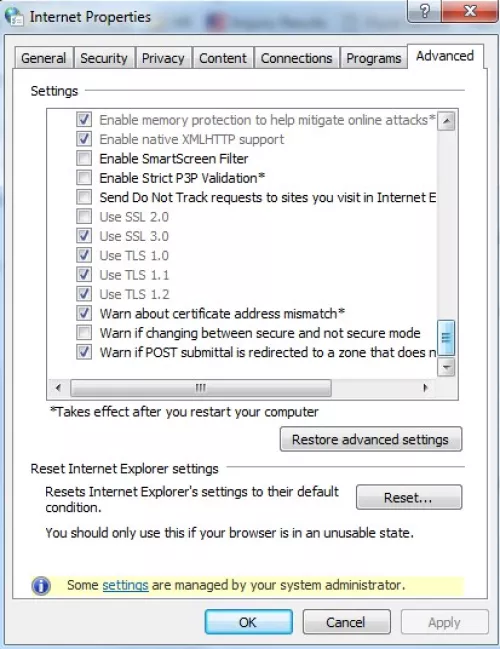
Contact the ASAP team
816-414-2145
asaphelpdesk@fiscal.treasury.gov
Standard ASAP Production Support Operating Hours are:
Monday through Friday (Except Federal Holidays) 7:30 a.m. to 6:00 p.m. Eastern Time