



The following outlines the process to create email notifications in IPP at www.ipp.gov.
Sign into IPP at www.ipp.gov and select Collector (Supplier) module. Sign in using ID.me or Login.gov. The IPP Collector home page will display.
- From the Home Page select the Preferences link.

- In the Preferences section select the Notification Schedule link under Additional Options.

- Choose Create Notification to create a new notification.
Image

- Enter the specific information for the notification you are creating.
Image
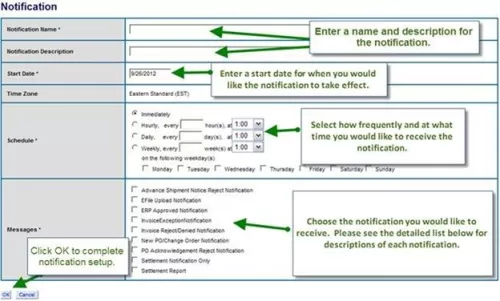
Notification Definitions
| Term | Definition |
| Payment Notification | The IPP Collector sends this notification when new payment settlement records are uploaded from Treasury or Agency systems. |
| Payment Return Notification | The IPP Collector sends this notification when a payment is returned by the supplier bank and the return report is uploaded to the IPP. |
| E-File Upload Notification (2008) | The IPP Collector sends this notification at the successful completion of Invoice eFile upload. |
| ERP Approved Notification | The IPP Collector sends this notification when an agency submits an invoice status update file which sets invoice status values to "approved". This IPP invoice status reflects the invoice status in the agency Enterprise Resource Planning (ERP) system. Note: This only applies to electronic invoices your organization has submitted via the IPP Collector. |
| Invoice Pay Me Now Notification | The IPP Collector sends this notification when an invoice qualifies for an early payment program set up by the associated agency. |
| Invoice Reject Notification | The IPP Collector sends this notification when an agency updates an invoice status to "rejected". This requires the agency to set the status in their ERP and then upload the status to the IPP. Note: This only applies to electronic invoices your organization has submitted via the IPP Collector. |
| Invoice Exception Notification | The IPP Collector sends this notification when an invoice is set in "Exception" status. Note: This only applies to electronic invoices your organization has submitted via IPP Collector. |
| PO Change Order Notification | The IPP Collector sends this notification when the associated agency sends a PO Update file to the IPP. Note: This only applies to electronic purchase orders the agency sends to the IPP. |
Additional Assistance
IPP Customer Support Help Desk
IPPCustomerSupport@fiscal.treasury.gov
Standard Operating Hours:
Monday - Friday (Except Federal Holidays)
8:00 AM - 6:00 PM EST
Return to the IPP Quick Reference Guide